A free online circuit simulator, right in your browser.
Design, simulate, and share electronic circuits with a full SPICE engine, a 5,000+ component library and a modern schematic editor. No install, free to get started. Built for students, educators, and professionals.
Components, or build your own
Professional-grade simulation
To get started
Runs in any browser
Everything you need to design, simulate, teach, and collaborate
A modern schematic editor, a full SPICE engine, 5,000+ components with a studio to build your own, real-time charts, and sharing built for teams and classrooms — all in the browser, nothing to install.
A schematic editor that gets out of your way
Fast and sleek, built on modern technology so laying out a circuit feels smooth and intuitive. Add parts, draw wires, and change values with instant feedback, right in the browser.
Automatic wire routing around existing components
Real-time interactive simulation as you edit
Rotate, mirror, multi-select, undo and redo
A whole suite of keyboard shortcuts to speed up your workflow
Netlist editor with SPICE autocomplete
Industry-standard SPICE, in the browser
The same SPICE simulation professionals rely on, now in your browser. Watch your circuit behave in real time, or run a proper DC, AC, or transient analysis when the numbers need to be right. No setup, and no waiting for a desktop tool to launch.
Real-time interactive simulation
DC operating point and DC sweep
AC small-signal sweep with Bode magnitude and phase
Transient analysis, plus noise, distortion, and more in the netlist
A growing library of 5,000+ components, and a studio to build your own
With over 5,000 official components (and more being added every week) plus a growing set built and shared by the community; the part you need is probably already here. And if it is not, the Custom Component Studio lets you build your own and drop it straight into a circuit.
5,000+ official components, plus a growing community set
A detail page for every official part
Custom Component Studio: custom parameters, dynamic symbols, interactive behavior
Search and open any part in one click
Component library
Search 5,000+ official partsNE555
TimerLM358
Op-ampTL072
Op-ampLM741
Op-ampSee exactly what your circuit is doing
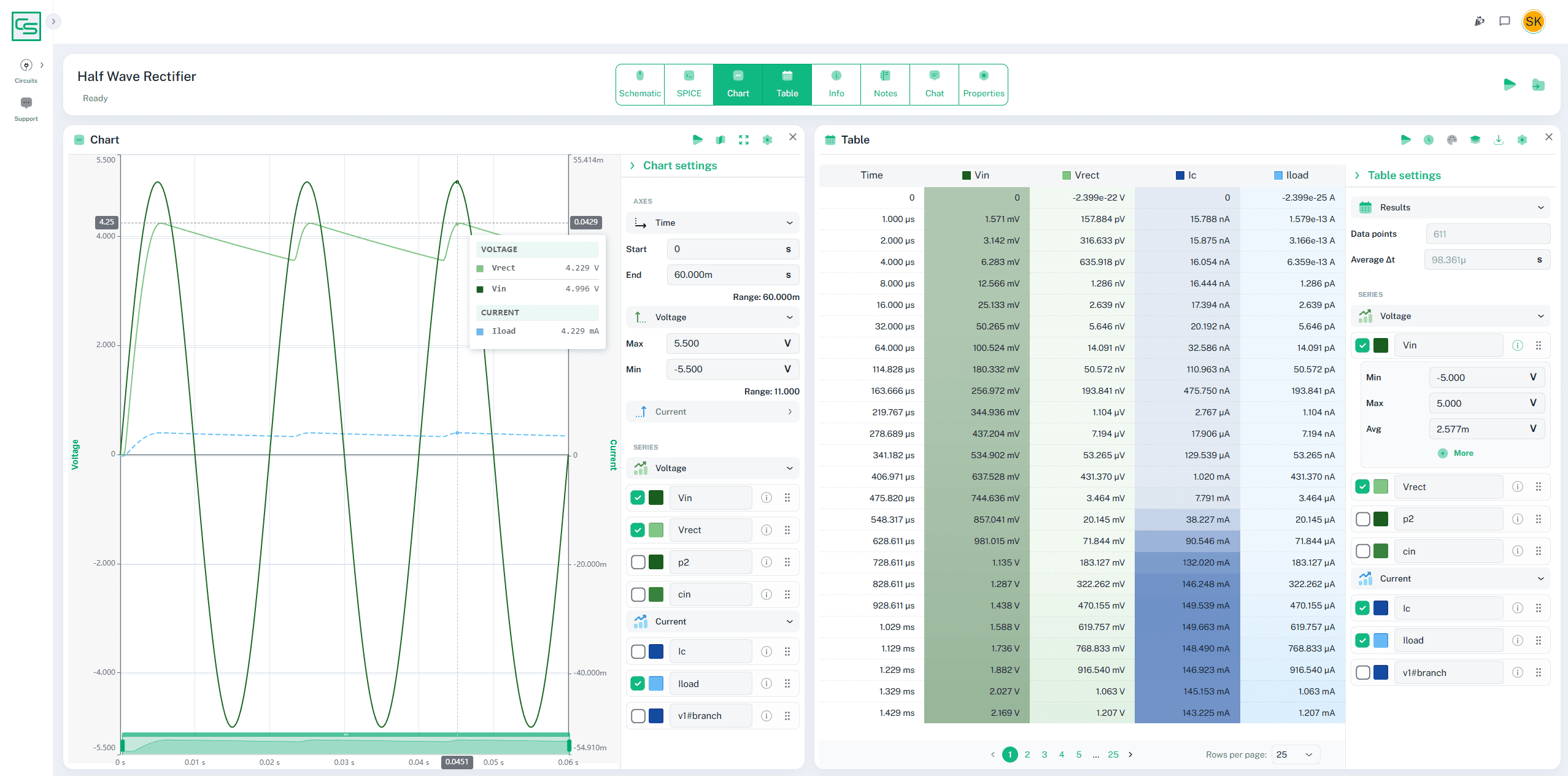
Visualize simulations with modern charting and graphing tools. Measure exact values with cursors, overlay signals to compare them, and check the frequency response when you need it. Need the data in a tool outside of CircuitSim? Export it to a spreadsheet in one click.
Live results as the simulation runs
Cursors for exact time and voltage readings
Gain and phase across frequency
Stack signals, recolor, and export to CSV
Tools for classrooms and teams
Share, manage, and collaborate on circuits and components using tools built to make classroom and team management a breeze.
Manage your whole class or team from one dashboard
Private student seats with no email address or password, for FERPA and COPPA
Owner and admin roles for members and access
Pay by card or flexible NET-30 invoice

Why switch to CircuitSim
Desktop tools are powerful but clunky. Web tools are easy but basic.CircuitSim has the best of both.
Desktop SPICE
LTspice, MultisimPowerful and accurate
Web sims
Falstad, TinkercadEasy, fast, and no install

CircuitSim
Full SPICE engine
Modern & easy to use
Zero install
Desktop SPICE
LTspice, Multisim — powerful and accurateCircuitSim
✓ Full SPICE engine
✓ Modern & easy to use
✓ Zero install
Web sims
Falstad, Tinkercad — easy, fast, and no installHow the tools compare
| What you want to do | CircuitSimModern SPICE simulation | Desktop SPICELTspice, Multisim | Lightweight web simsFalstad, Tinkercad |
|---|---|---|---|
| Open in a browser, nothing to install | ✓ | – | ✓ |
| Full SPICE — DC, AC & transient analysis | ✓ | ✓ | ~ |
| Modern drag-and-drop editor | ✓ | ~ | ✓ |
| 5,000+ parts & a build-your-own studio | ✓ | ~ | ~ |
| Import circuits from another tool | ✓ | ~ | – |
| Share a link & collaborate | ✓ | – | ~ |
| Classroom seats, FERPA/COPPA-ready | ✓ | – | – |
| Free to start | ✓ | ~ | ✓ |
| Works fully offline | – | ✓ | ~ |
Start free. Upgrade when you outgrow it.
Every plan includes the full SPICE engine. Paid plans add private circuits and more room to build.
Basic
$0
free forever- 5 circuits
- 5 custom components
- Up to 5 components per circuit
- Core simulations (interactive, transient, AC & DC analysis)
- Public sharing
Standard
$2.50/mo
billed annually ($30)- 10 circuits
- 10 custom components
- Up to 15 components per circuit
- All simulation types, including DC Sweep
- Private circuits & components
Premium
$7.50/mo
billed annually ($90)- Unlimited circuits
- Unlimited custom components
- Unlimited components per circuit
- All simulation types
- Private circuits & components
Teaching a class or running a team? Group licenses start at two seats, billed by card or NET-30. Prices in USD.
We want CircuitSim to be within reach. We've worked hard to make it as affordable as possible, but we know that is not always low enough. If the cost is genuinely out of reach, email us at hello@circuitsim.com with what you can afford, and we will do what we can.
Set up your classroom before the first bell.
No installs on lab machines, no license keys to hand out, and nothing to set up. Share a starter circuit with the whole class, assign and review work, and manage everyone from one dashboard — so class time goes to teaching, not troubleshooting. Need seats for FERPA and COPPA? Assign private seats students open with a sign-in link. No student accounts, email addresses or passwords.
What educators get
Private student seats
No student email addresses or passwords. Built for schools with FERPA and COPPA obligations.
Works on any device
Chromebooks, lab PCs, or a student laptop — if it runs a modern browser, it runs CircuitSim.
One dashboard
Assign seats, share circuits, and manage the roster from a single place.
Simple billing
Group licenses from two seats, paid by card or on NET-30 terms.
Build your first circuit in the next five minutes.
No install, free to get started. Open the editor, drop in a few components, and run a simulation.
Questions about the free circuit simulator
Find quick answers for getting started, managing groups, and running advanced circuit simulations.
All you need is an internet connection and a modern web browser, such as Chrome, Safari, Edge, or Firefox. CircuitSim runs entirely in the browser—no downloads or installations required.
Yes! CircuitSim offers a free tier for individual users. Paid tiers offer premium features such as an extended component library, more components per circuit, group management, and team collaboration tools.